
How do I ensure a password is set during setup? If the device password profile is assigned after enrollment, you aren’t prompted to set a password during device setup, as detailed here “Tips for assigning device password settings to Android Enterprise fully managed devices in Intune – Intune | Microsoft Learn“.
The best way to get around this issue is to create the device configuration profile with just the device password settings and apply the policy to “All users” with a filter applied targeting the enrollment profile.
For this example, we will be wanting to ensure the user sets a password during the setup of an Android Enterprise Fully managed device.
Prerequisites
- Create a Android enrollment profile (Fully managed / COBO).

steps
- Create filter based on Android enrollment profile.

- Create the device configuration profile with device password settings.
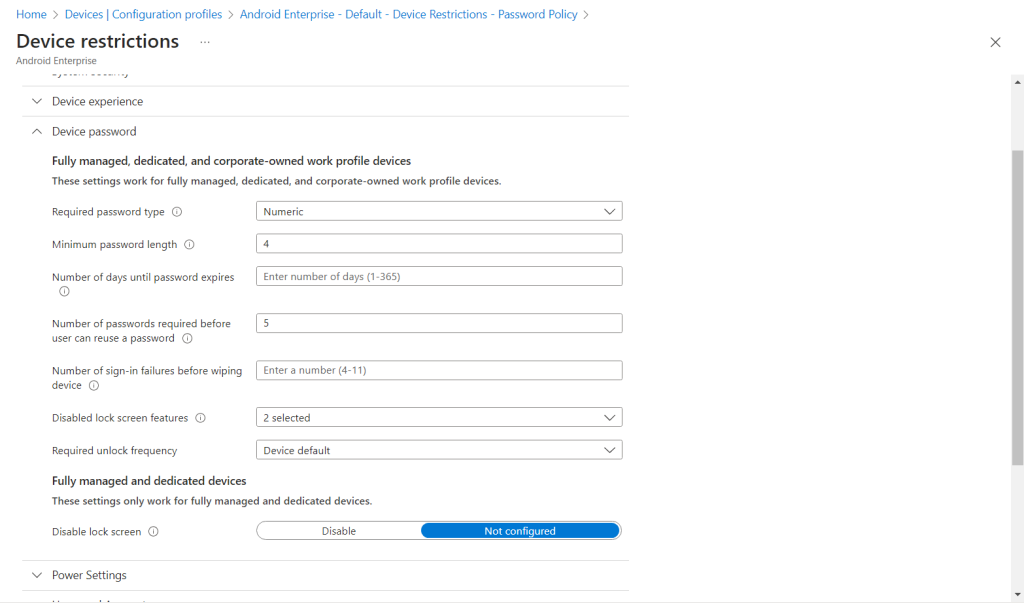
- Assign device configuration profile to “All users” but add the filter created earlier making sure the filter is set to “Included”.
